My Stocks
A screen where you collect stocks you care about and enter quantities.
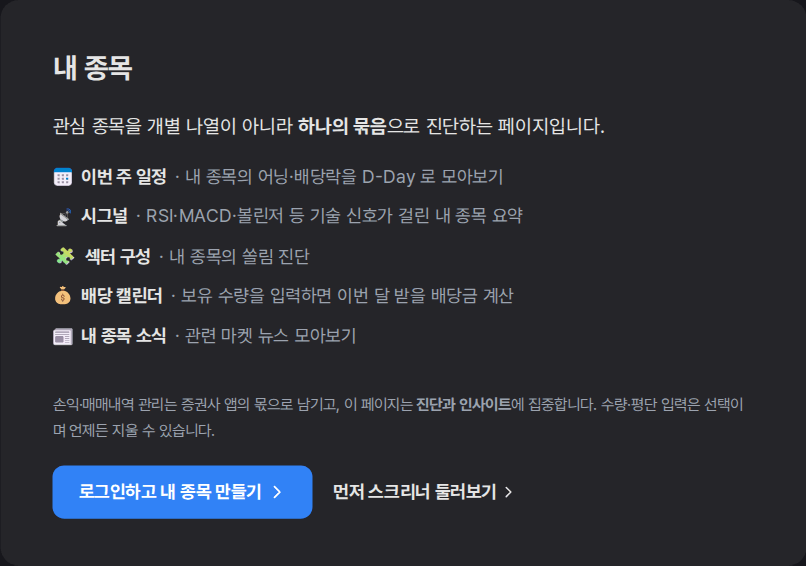
My Stocks is the screen where you collect stocks you are interested in.
Once added, you see earnings dates, dividend dates and triggered signals in one place.
The list is saved to your account, so you need to log in to see it.
How to save stocks
- Click Add to watchlist next to the name at the top of a stock page.
- Go to My Stocks in the menu bar to see all your saved stocks.
- You can also open the list on the side with the heart icon on the far right.
- To remove one, click the same button again.
Enter quantity and average cost
If you enter a quantity, the total value and profit or loss appear at the top.
- Each stock row has Qty and Avg fields on the right.
- Type a number and click outside the field to save it.
- A check mark appears next to the field for a moment when saved.
- Clear the field to remove the value.
What you see after adding stocks
Even without a quantity, the four items below still appear.
- This week's events: upcoming earnings and ex-dividend dates
- Signals: technical signals triggered today
- Sector mix: whether you lean too much on one sector
- My Stocks news: only the articles about your saved stocks
This month's dividend amount counts only stocks with a quantity entered.
How to read the numbers at the top
If any stock has a quantity, a summary line appears.
- Market Value is the total of your shares at current prices.
- The unrealized profit or loss is the difference from what you paid.
- During market hours it uses live prices.
- When the market is closed it uses the previous close.