Calendar · News · Community
Screens where you keep up with events and news, and leave a comment.
There are three screens for keeping up with dates and news.
The Calendar shows what is coming, and News shows what already happened.
The Community is where you leave a comment about today's market.
Calendar
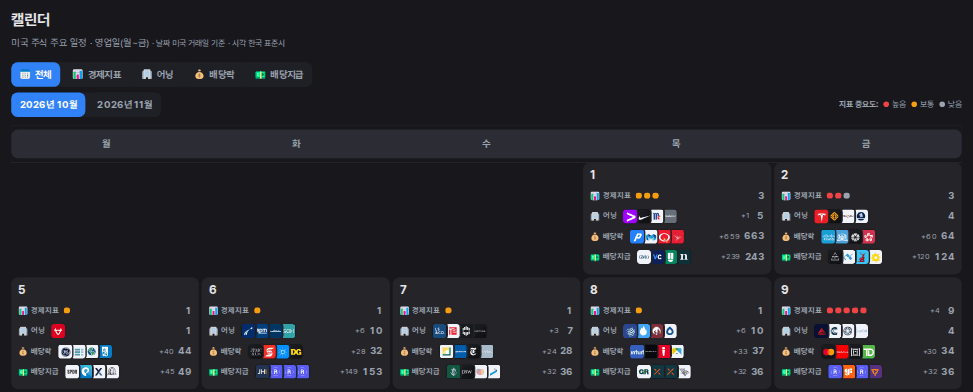
- Each cell is one day and shows how many events of each type it has.
- Click a cell to open that day's events in the panel on the right.
- Use the tabs at the top to see only Earnings or only Ex-Dividend.
- Click a month button to move to the next month.
- Earnings day is when a company reports its results for three months.
- You need to buy before the ex-dividend date to get that dividend.
- Economic indicators are economic figures that a country releases.
A red dot next to an indicator means the market reacts to it strongly.
News
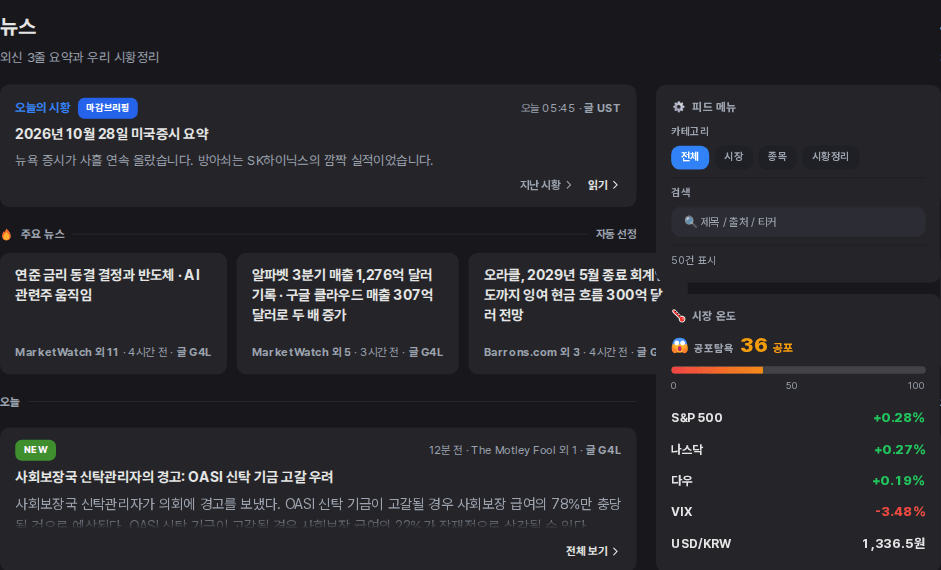
- Today's market at the top is a write-up of that day's market.
- Top News are stories covered by several outlets.
- New articles follow below in time order.
- The chips under an article show related stocks.
- Pick a type or search in the feed menu on the right.
- Click a title to read a summary in plain words.
Community

- On the left, choose Open Board or Guestbook.
- After you log in, post with Write at the top right.
- If you tag a stock, its price at that moment is saved too.
- You can also open the guestbook with the speech bubble icon on the far right.