Getting Started
What to do first if you are new, from signup to installing the app.
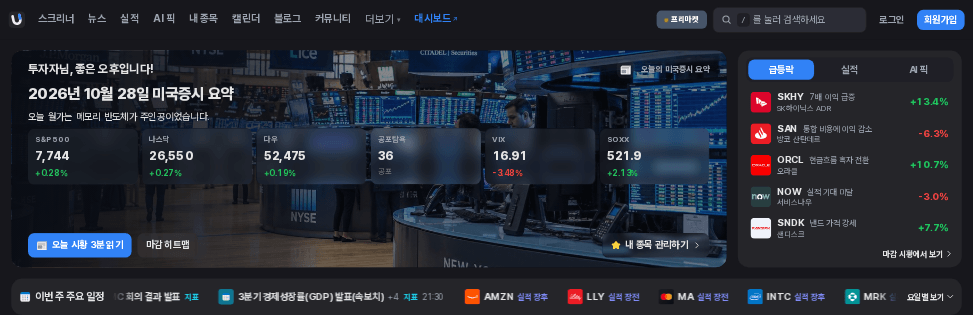
You can view most of US STOCK TODAY without signing up.
After you sign up, your saved stocks are kept and you can get notifications.
If you are new here, follow the steps below in order.
If you are new, start here
If you are not sure what to look at first, this order works well.
- On the home screen, check how the US market did today.
- Read what happened overnight in News.
- Set conditions in Screener to find stocks.
- Add stocks you like to My Stocks.
- Check the next earnings date in Calendar.
All five are in the menu bar at the very top of the screen.
How to sign up
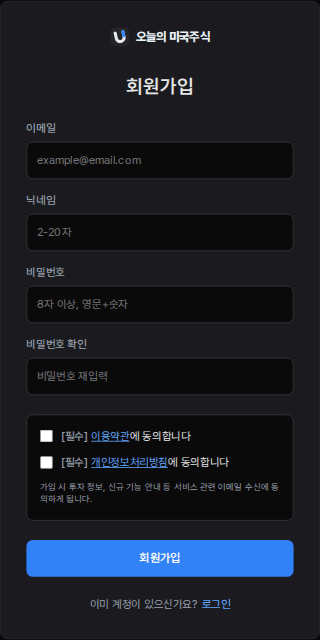
All you need to sign up is an email, a nickname and a password.
- Click Sign up in the top right of the screen.
- Enter your email, nickname and password.
- Agree to the two terms boxes and click Sign up.
- Log in again and you are all set.
How to save stocks

Once saved, you can see that stock's earnings and dividend dates in one place.
- Type a ticker in the search at the top to open the stock page.
- Click Add to watchlist next to the name.
- See all your saved stocks in My Stocks in the menu bar.
- Click the heart icon on the far right to open the list on the side.